

Connect Order Flow Explained
When we say “order flow” we mean the process that orders take when they get piped in from the sales channels to a Connect storefront, from processing states, the review process, fulfillment and shipping.
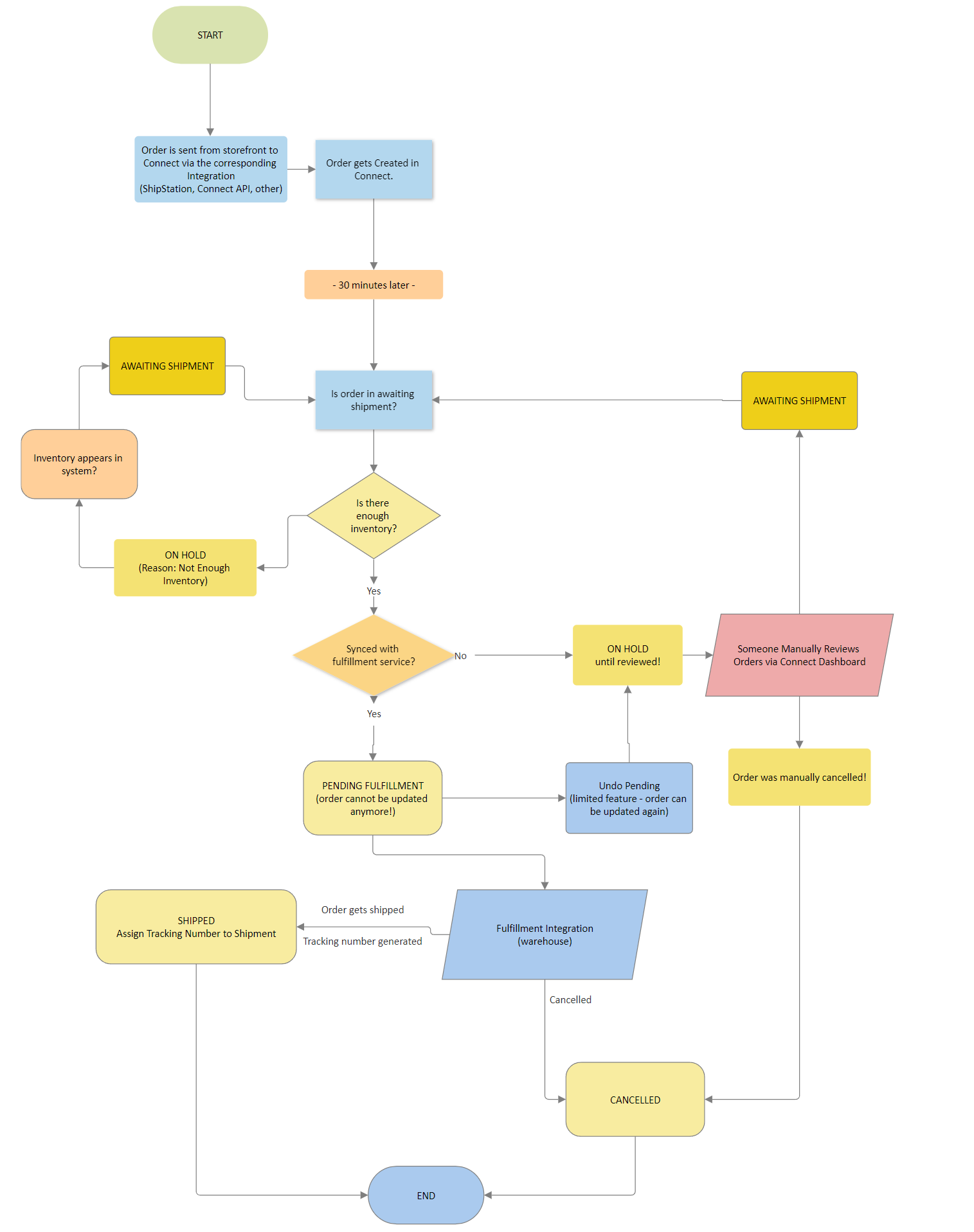
The steps are the following:
- Orders are processed half an hour after they are created in Connect (grace period that allows them to be cancelled or updated in the storefront still, if needed)
- While being processed, they are marked as pending fulfillment once the order is in the warehouse being picked, packed and shipped
- If the order cannot be fulfilled at the warehouse for whatever reason (no inventory, unknown storefront SKUs used, missing config for mapping the ship method instructions), they are put on hold
- Orders are manually reviewed and removed from hold (or cancelled), or in some cases like missing inventory, they are automatically reviewed and removed from hold when inventory is detected
- Once a tracking number is available the order is marked as shipped, and if possible, the package is being tracked
Important things to consider
Section titled “Important things to consider”- Orders that are pending fulfillment are in the hands of the fulfillment service, that is the warehouse in question, and cannot be updated at that point. If there is a need to cancel the order, change anything regarding it (ship to address, items being shipped…) this happens inside the Connect dashboard. It can either be achieved via the “Undo Pending” options which removes the order from the fulfillment service, and it will not be processed by fulfillment. Doing so puts the order on hold until it is reviewed, updated in whatever form is required, and moved back to awaiting shipment to repeat the process, if that is the intended path for it to take.
- Orders that are pending fulfillment, but are already allocated and being picked, cannot be automatically removed from the fulfillment service queue, instead they go through the manual process of removal by using the customer support features available to the customer.